
Matching emojis (tap to copy)
Nicknames shared by visitors
🆕 Just added for
Share your own nickname
A username change limit is the waiting period, or the maximum number of changes, that an app sets on your unique @username or on the name people see on your profile. This page compares those rules for Instagram, WhatsApp, TikTok, Snapchat, Discord, YouTube and Telegram, using only each app’s own help pages, read by the SnapNick editorial team on 16 September 2026. Where a help page says nothing, the table says Not documented instead of guessing. The generator above styles a new display name if you are about to change yours.
How many times can you change your name on each app?
You can change a TikTok @username once every 30 days, a TikTok nickname once every 7 days, a YouTube channel name or handle twice within 14 days, a Snapchat username once a year and a Discord username up to 2 times a week. Display names on Snapchat and Discord can be changed any time, and Instagram and WhatsApp do not publish a number for everyday accounts.
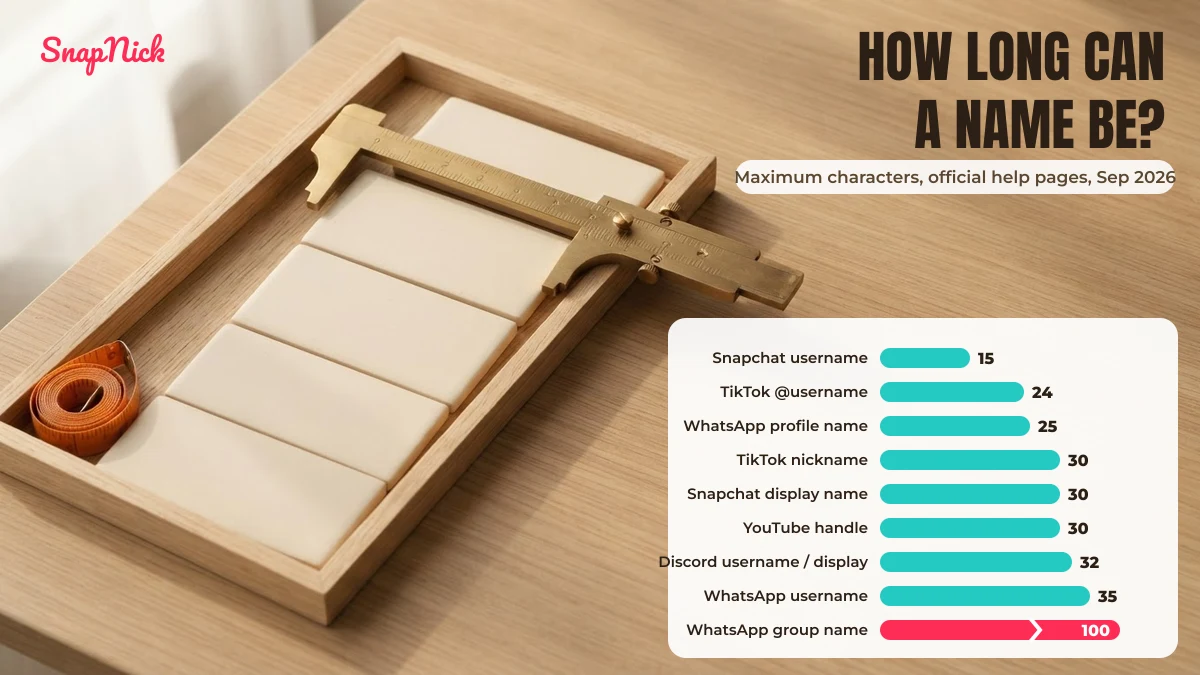
| App and field | How often you can change it | Length | Allowed characters | Styled letters or emoji? | Source |
|---|---|---|---|---|---|
| Instagram username | Not documented | Not documented | Not documented (Help Center suggests periods, numbers, underscores or abbreviations when a name is taken) | Not documented | Instagram Help Center, Sep 2026 |
| Instagram name | Not documented for standard accounts; Meta Verified creator profiles: twice every 14 days | Not documented | Not documented | Not documented | Instagram Help Center, Sep 2026 |
| WhatsApp profile name | Not documented | 25 characters | Emoji button offered | Emoji: yes; styled letters: not documented | WhatsApp Help Center, Sep 2026 |
| WhatsApp username (@) | Limited, but no number published; a deleted username can be reclaimed for 14 days | 3–35 characters | Lowercase a–z, 0–9, _ and .; cannot be numbers only | No | WhatsApp Help Center, Sep 2026 |
| WhatsApp group name | Not documented | 100 characters | Emoji button offered | Emoji: yes; styled letters: not documented | WhatsApp Help Center, Sep 2026 |
| TikTok username (@) | Once every 30 days | 2–24 characters | Letters, numbers, _ and .; no period at the end | No | TikTok Support, Sep 2026 |
| TikTok nickname | Once every 7 days | Up to 30 characters | Not documented | Not documented | TikTok Support, Sep 2026 |
| Snapchat username | Once a year (12 months to the day) | 3–15 characters | Latin letters, numbers and one of – _ .; starts with a letter, ends with a letter or number; no phone number | No | Snapchat Support, Sep 2026 |
| Snapchat display name | Any time | Up to 30 characters, spaces included | Letters, numbers, emoji and most special characters; no phone number | Yes | Snapchat Support, Sep 2026 |
| Discord username | Up to 2 times a week | 2–32 characters | Lowercase a–z, 0–9, _ and .; no two periods in a row | No | Discord Support, Sep 2026 |
| Discord display name | Any time | 1–32 characters | Special characters, spaces, emoji, uppercase and non-Latin letters | Yes | Discord Support, Sep 2026 |
| YouTube channel name | Twice within 14 days; removes a verification badge | Not documented | Not documented (must follow Community Guidelines) | Not documented | YouTube Help, Sep 2026 |
| YouTube @handle | Twice within 14 days; old handle held for 14 days | 3–30 characters (Han or Hangul 1–10; Ethiopic, Hiragana or Katakana 2–20) | Letters or numbers from 75 supported languages; _ – . · but not at the start or end | Letters from supported languages only | YouTube Help, Sep 2026 |
| Telegram username | Not documented | 5–32 characters | a–z (case-insensitive), 0–9 and _ | No | Telegram FAQ + API docs, Sep 2026 |
Sources, all read on 16 September 2026: Instagram — How to change your Instagram profile information, When you can change your Instagram username to a name you’ve used before, What can you do if an Instagram username is already claimed and Profile name eligibility for Meta Verified creator subscriptions; WhatsApp — How to edit your profile, How to create and manage your username, About usernames and How to make changes to groups; TikTok — Changing your username and Changing your nickname; Snapchat — How do I change my Snapchat username?; Discord — New Usernames & Display Names and How do I change my Username?; YouTube — YouTube Help: Manage your YouTube channel’s profile, YouTube Help: Learn about YouTube handles and YouTube Help: Change, view, or hide your handle; Telegram — the Telegram FAQ for allowed characters and the API method account.updateUsername for the 5–32 length.
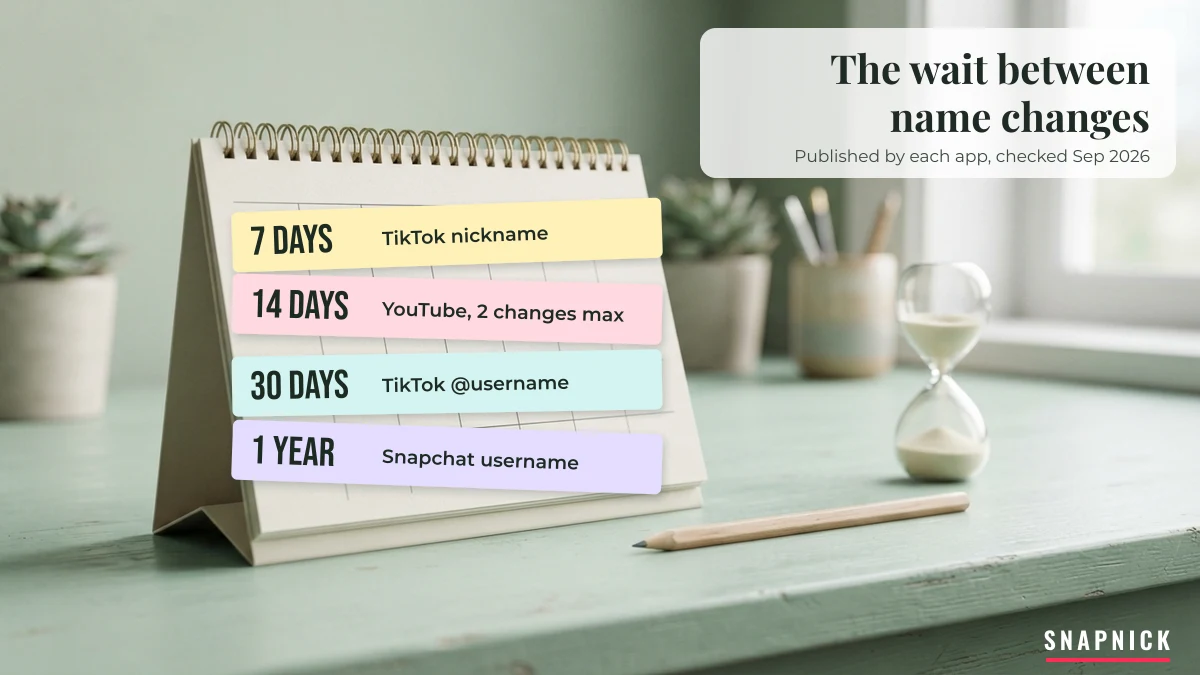
Every rule on this page is marked with the date we checked it. Apps change these limits without notice, so verify on the app’s own help page before you rely on one — and if you spot a rule that has changed, tell us through our contact form and we will re-check it.
How many times can you change your Instagram name or username?
Instagram’s Help Center does not publish a fixed number of changes for the name or username of an everyday account. The only written limit is for Meta Verified creator profiles: their verified profile name can be updated twice every 14 days, according to Profile name eligibility for Meta Verified creator subscriptions.
That page is also the source of the “twice within 14 days” rule people ask about, and it applies to the verified profile name, not to every account. If Instagram shows a waiting message inside your own app, that message is the rule for your account; the Help Center simply does not list a general number. What the Help Center does say about changes:
- If your account reaches a lot of people, a username change may need to be reviewed; otherwise it changes immediately if the name is available.
- Your followers may be notified of your username change.
- In most cases you can change back to a username you used before, as long as nobody new has taken it and it has not recently been removed from an active account you do not own.
- Verified names must match your ID or an accepted format, and symbols, numbers, unusual capitalisation and mixed languages are not accepted for them.
How to change your Instagram name or username
- Go to your profile and choose Edit profile, or open Settings and then Accounts Center, Profiles.
- Select the name or username.
- Type the new one and save with Submit or Done.
Instagram does not publish which characters a username accepts, so the checker further down leaves Instagram out rather than invent a rule. For the Name field, where styled letters usually go, our nicknames for Instagram guide separates handle ideas from styled display names.
What is the TikTok username change limit?
TikTok lets you change your username once every 30 days and your nickname once every 7 days, according to TikTok Support’s Changing your username and Changing your nickname articles. The username must have 2 to 24 characters and can only contain letters, numbers, underscores and periods, with no period at the end.
The two fields do different jobs. The username is the @tag that makes up your profile link, so changing it also changes the link. The nickname is the name on your account that appears in the For You feed, comments and direct messages, and can be up to 30 characters. TikTok lists four more things to know before a username change:
- If you give up a username, you cannot add it to an account again for a short period.
- You cannot switch to a username that is unavailable, including one held by a suspended or deactivated account.
- You cannot change it at all if you are blocked from updating your profile.
- Verified accounts contact TikTok to change the username.
How to change your TikTok username or nickname
- In the TikTok app, tap Profile, then Edit profile.
- Tap Username, or Name for the nickname.
- Enter the new name and tap Save.
If you are picking the name first, the TikTok nicknames list has usernames already checked against the 2–24 rule and styled nicknames for the 30-character field.
How often can you change your WhatsApp name?
WhatsApp’s Help Center gives no waiting period for your profile name, which can be up to 25 characters. For the newer @username it says there is a limit to how many times you can change it but does not state the number, according to How to create and manage your username (checked September 2026).
WhatsApp has three name fields, and each behaves differently:
- Profile name: up to 25 characters, with an emoji button. It is visible to people in groups who have not saved your contact.
- Username: optional and unique, 3 to 35 characters of lowercase a–z, 0–9, underscores and periods, and not numbers only. Usernames are rolling out gradually, and where they are not live yet you can reserve one. If you delete a username you have 14 days to reclaim it; after a change, your previous username may become available to others.
- Group name: up to 100 characters with emoji. By default any member can change it, unless an admin limits editing to admins.
Who sees a change also depends on the field. According to About usernames, people who already have your number saved keep seeing the contact name they saved, while people who do not have it see your username.
How to change your WhatsApp username or profile name
- Open Settings and tap the area around your profile photo.
- For the username, tap Username, then Edit and Change username; for the profile name, edit the name field.
- Enter the new name and save.
For groups, the WhatsApp group names collection sorts 150 group names by the kind of group, all inside the 100-character limit.
How often can you change your name on Snapchat, Discord, YouTube and Telegram?
Snapchat allows one username change a year, Discord two username changes a week, and YouTube two changes to a channel name or handle within 14 days. Telegram publishes no change limit. On Snapchat and Discord the display name can be changed any time.
Snapchat: username once a year, display name any time
Snapchat Support says you can change your username once a year, counted as 12 months to the day since your last change (How do I change my Snapchat username?). The username must be 3–15 characters, start with a letter and end with a letter or number. The display name can be updated any time and holds up to 30 characters including spaces, but friends who added you earlier may keep seeing the name they saw when they added you. To change either: Settings, My Account, then Username or Name under Change My Info.
Discord: username 2 times a week, display name whenever you want
Discord Support says username changes are limited to 2 a week, while the display name can be changed “even from one minute to the next”. Usernames are 2–32 characters, forced to lowercase, and use only a–z, 0–9, underscores and periods, never two periods in a row; display names are 1–32 characters and can include emoji. To change the username: User Settings, My Account, Edit, then confirm with your password. Discord, Telegram and Snapchat name ideas are collected in our Discord, Telegram and Snapchat nicknames page.
YouTube: channel name and handle twice within 14 days
YouTube Help says you can change your channel name twice within a 14-day period, and your handle twice within 14 days. Changing the channel name removes a verification badge, and a previous handle is held for 14 days, during which both the old and new handle URLs work. Handles are 3–30 characters in most scripts. To change either: YouTube Studio, Customization, Profile, then Publish. Channel name ideas by niche are on our YouTube channel names page.
Telegram: no published limit
The Telegram FAQ does not mention a limit on changing your username. It allows a–z, 0–9 and underscores, case-insensitive, and Telegram’s API documentation adds a length of 5–32 characters. Your username is public and findable in global search; to remove it, save an empty username in Settings.
How often can you change your name in Free Fire and BGMI?
Free Fire and BGMI do not limit name changes by a waiting period the way social apps do; they charge for them. In Free Fire a rename uses a Name Change Card or diamonds, and in BGMI (Battlegrounds Mobile India) it uses a Rename Card. Neither Garena nor Krafton publishes a cooldown on its help pages, so treat the rows below as verify in game.
| Game and field | What a change costs | Cooldown | Styled letters or symbols? |
|---|---|---|---|
| Free Fire in-game name | Name Change Card or diamonds (verify the price in the in-game store) | None published (verify) | Many decorative symbols are accepted; for a space between words use the no-break space U+00A0, as U+3164 has been blocked since OB43 |
| Free Fire guild name | Changed by the guild leader in guild settings (verify cost) | None published (verify) | Check the in-game counter before you confirm |
| BGMI player name | Rename Card (verify how your account received it) | None published (verify) | Paste and check in the rename box before you confirm (verify) |
Because a game rename costs something, test a styled name before you spend: paste it into the rename box, check that nothing shows as a box and that the counter accepts it, and only then confirm.
Why are usernames harder to change than display names?
A username is a unique identifier, so a change frees the old name for someone else; a display name is not unique, so changing it affects nobody else. That is why the strictest limits in the table sit on usernames: Snapchat once a year, TikTok 30 days, Discord twice a week.
The help pages show the effect of that uniqueness in what happens to the old name:
| App | Your previous username | Who notices the change |
|---|---|---|
| Can usually be taken back if nobody new has claimed it | Followers may be notified | |
| May become available to others; a deleted username can be reclaimed for 14 days | Saved contacts keep seeing the name they saved | |
| TikTok | Cannot be added to an account again for a short period | Profile link changes with the username |
| YouTube | Old handle held for 14 days, both URLs work, then anyone can take it | New name can take a few days to show everywhere |
| Snapchat | Not documented | Friends who added you may still see the old display name |
| Discord | Not documented for the new username system | Server and friend nicknames override the display name where set |
Styled Unicode letters such as 𝓐𝓪𝓻𝓪𝓿 belong in the display name. Every username rule in this comparison that lists its characters allows only plain letters, digits and a few separators; YouTube handles are the widest, accepting letters from 75 languages but still no decorative symbols.
Does your username pass each app’s rules? 15 names checked with code
We turned each published username rule into a code check and ran 15 sample names through all six on 16 September 2026. Only 2 names, rohan_07 and kavya, passed on every app; a period, a hyphen or a capital letter was enough to fail at least one. Instagram is not included because its Help Center publishes no username format.
| Username | TikTok | Snapchat | Discord | YouTube | Telegram | |
|---|---|---|---|---|---|---|
priya.sharma |
Pass | Pass | Pass | Pass | Pass | No: bad character |
rohan_07 |
Pass | Pass | Pass | Pass | Pass | Pass |
kavya |
Pass | Pass | Pass | Pass | Pass | Pass |
aarav..official |
Pass | Pass | Unclear | No: double period | Pass | No: bad character |
meera. |
No: ends with . | Pass | No: bad last character | Pass | No: separator at edge | No: bad character |
_neha |
Pass | Pass | No: must start with a letter | Pass | No: separator at edge | Pass |
ab |
Pass | No: too short | No: too short | Pass | No: too short | No: too short |
9876543210 |
Pass | No: numbers only | No: must start with a letter | Pass | Pass | Pass |
desi-vlogs |
No: bad character | No: bad character | Pass | No: bad character | Pass | No: bad character |
chai.lover_99 |
Pass | Pass | Unclear | Pass | Pass | No: bad character |
Kavya.Writes |
Pass | No: bad character | Pass | Pass | Pass | No: bad character |
𝗥𝗼𝗵𝗮𝗻 |
No: bad character | No: bad character | No: bad character, must start with a letter, bad last character | No: bad character | No: bad character | No: bad character |
rahul sharma |
No: bad character | No: bad character | No: bad character | No: bad character | No: bad character | No: bad character |
aditya.kumar.official.2026 |
No: too long | Pass | No: too long, 2+ separators | Pass | Pass | No: bad character |
the.real.aditya.kumar.official.2026x |
No: too long | No: too long | No: too long, 2+ separators | No: too long | No: too long | No: too long, bad character |
Three notes on the results. Discord forces usernames to lowercase, so Kavya.Writes passes but would be saved as kavya.writes. Snapchat’s page allows “one of -, _, or .” without saying whether that means one character or one kind of separator, so names with two separators are marked unclear. And a pass only means the format is right: whether the name is free, and whether it breaks community guidelines, is decided inside each app.
These are the rules as written in the checks, so you can reuse them:
TikTok     ^(?=.{2,24}$)[A-Za-z0-9_.]*[A-Za-z0-9_]$
WhatsApp   ^(?![0-9]+$)[a-z0-9_.]{3,35}$
Snapchat   ^(?=.{3,15}$)[A-Za-z][A-Za-z0-9]*([-_.][A-Za-z0-9]+)?$   (one separator, our reading)
Discord    ^(?!.*\.\.)[a-z0-9_.]{2,32}$   (after lowercasing)
YouTube    ^[A-Za-z0-9](?:[A-Za-z0-9_.\-·]{1,28})[A-Za-z0-9]$   (Latin letters only)
Telegram   ^[A-Za-z0-9_]{5,32}$
Do styled display names fit the character limits?
Most styled display names fit, but a two-word name in bold or script letters can pass WhatsApp’s 25-character limit if the app counts the way many phones store text. We measured 8 styles of “Ananya Sharma” from the SnapNick generator on 16 September 2026: bold and script letters take 2 UTF-16 units each, so a name that is 13 characters in plain text grows to 27–29 units.
| Display name | Code points | UTF-16 units | WhatsApp 25 | TikTok and Snapchat 30 | Discord 32 |
|---|---|---|---|---|---|
| ᴾᴿᴼ 𝗔𝗻𝗮𝗻𝘆𝗮 𝗦𝗵𝗮𝗿𝗺𝗮 | 17 | 29 | Only if counted by code points | Fits | Fits |
| ♡ 𝒜𝓃𝒶𝓃𝓎𝒶 𝒮𝒽𝒶𝓇𝓂𝒶 ♡ | 17 | 29 | Only if counted by code points | Fits | Fits |
| xX🅐🅝🅐🅝🅨🅐🅢🅗🅐🅡🅜🅐Xx | 16 | 28 | Only if counted by code points | Fits | Fits |
| 𝔸𝕟𝕒𝕟𝕪𝕒 𝕊𝕙𝕒𝕣𝕞𝕒 ࿐ | 15 | 27 | Only if counted by code points | Fits | Fits |
| ˚₊· Ananya Sharma ·₊˚ | 21 | 21 | Fits | Fits | Fits |
| Ⓐⓝⓐⓝⓨⓐ Ⓢⓗⓐⓡⓜⓐ ツ | 15 | 15 | Fits | Fits | Fits |
| ๛ ᴀɴᴀɴʏᴀ ꜱʜᴀʀᴍᴀ | 15 | 15 | Fits | Fits | Fits |
| ଘ A n a n y a S h a r m a | 26 | 26 | Too long | Fits | Fits |
None of the help pages says whether it counts code points or UTF-16 units, so “Only if counted by code points” means the name may or may not be accepted. The spaced-out style is too long for WhatsApp either way, because every thin space counts as a character. If an app cuts your name, remove the frame symbols first.
Valid username examples to copy for each app
Each username below passed that app’s published format rule in our code check on 16 September 2026. They are starting points, not reservations: any of them may already be taken, so add a word or number of your own before you save.
TikTok usernames that pass the rules
2–24 characters, letters, numbers, _ and ., no period at the end.
WhatsApp usernames that pass the rules
3–35 characters, lowercase only, not numbers only.
Snapchat usernames that pass the rules
3–15 characters, one separator, starts with a letter.
Discord usernames that pass the rules
2–32 characters, lowercase, no double periods.
YouTube usernames that pass the rules
3–30 characters, separators only in the middle.
Telegram usernames that pass the rules
5–32 characters, underscores but no periods.
Styled display names from the generator
These came straight from the SnapNick generator for Aarav, Meera and Rohan. They suit a display name, nickname or profile name field, never a username.
Short symbols for a display name
Symbols count toward the limit too: a single ☪︎ adds 2 UTF-16 units, while the moon-phase frame ◯ ☽ ◑ ● ◐ ❨ ◯ adds 13, so use one small symbol when you are close to WhatsApp’s 25.
Questions people ask about name change limits
How often can I change my IG name?
Instagram's Help Center does not publish a limit for the name on a standard account. It only states a limit for Meta Verified creator profiles, whose verified name can be updated twice every 14 days (checked September 2026).
Can I change my Instagram name twice within 14 days?
The twice-every-14-days rule on Instagram's Help Center is written for Meta Verified creator profile names. For other accounts the Help Center gives no number, so the message inside your own app is the rule that applies.
How many times can I change my TikTok username?
Once every 30 days, according to TikTok Support. The nickname, which is the name shown across TikTok, can be changed once every 7 days.
Do I have to wait 7 days to change my name on TikTok?
Yes for the nickname: TikTok Support says nicknames can only be changed once every 7 days. The @username has a separate limit of once every 30 days.
Why can't I change my username on TikTok?
TikTok Support's rules point to four causes: you changed it within the last 30 days, the new username is unavailable or held by a suspended or deactivated account, you are blocked from updating your profile, or the name breaks the 2–24 character format.
Can the other person see if you change your name on WhatsApp?
People who have your number saved keep seeing the contact name they saved. Your profile name shows to people in groups who have not saved your contact, so they see the new one.
How many times can you change your Snapchat username?
Once a year, counted as 12 months to the day since your last change, according to Snapchat Support. Your display name can be changed any time.
These rules change without notice. This comparison was checked on 16 September 2026; if an app tells you something different today, the app is right. For a new name to go with the change, try the SnapNick nickname generator at the top of this page.
Type a keyword and get styled variants you can copy straight into your profile.